Understanding Controller Services in Clockspring
Many processors reference the use of a Controller Service, but users may not fully understand their purpose. Controller Services provide shared configuration and execution services that can be used by processors, reporting tasks, and other components in Clockspring.
Instead of configuring individual processors with duplicate settings, a Controller Service allows you to define a reusable service that multiple processors can reference.
Overview
-
Purpose: Centralize configuration settings that can be reused across multiple processors.
-
Use Cases:
-
Simplifying SSL truststore/keystore management with a single SSL Context Service.
-
Standardizing database connections to avoid configuring credentials in multiple processors.
-
Managing external system authentication centrally instead of setting credentials per processor.
-
Scope: Controller Services are assigned at different levels (Root Canvas vs. Process Groups) to control availability.
How Controller Services Work
Controller Services provide shared functionality to processors and reporting tasks. This ensures that commonly used configurations—such as SSL settings or database connections—can be set once and referenced without duplicating settings in each processor.
Example 1: SSL Context Service
A SSL Context Service manages truststores and keystores for validating SSL certificates. Instead of manually entering these details for every processor, you define the SSL Context Service once and reference it when needed.
Example 2: Database Connection Service
Connecting to a database requires multiple details: - Database connection string - Driver type - Authentication credentials
Rather than configuring these settings in each processor, a DBCPConnectionPool Controller Service can be created. Processors that need database access will reference this service instead of storing credentials individually.
Controller Service Availability and Inheritance
Controller Services are only available to the Process Group where they are defined and any child groups. If a Controller Service is needed across multiple Process Groups, it must be defined at a higher level, such as the Root Canvas.
Example Scenario: Nested Controller Services
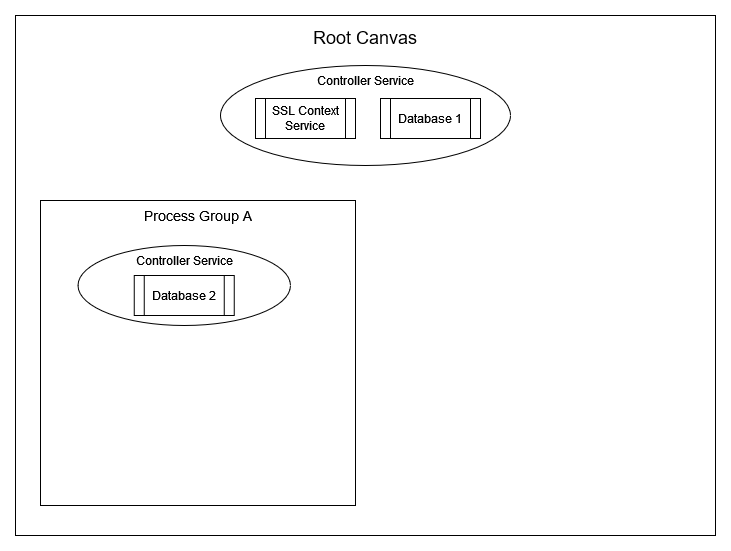
In this scenario, Controller Services are assigned at different levels:
Root Canvas Level (Global)
-
SSL Context Service
-
Database 1
Availability: All Process Groups in Clockspring inherit these services.
Process Group A
-
Database 2
Availability: Processors in Process Group A can use Database 2, along with Database 1 and SSL Context Service (inherited from Root Canvas).
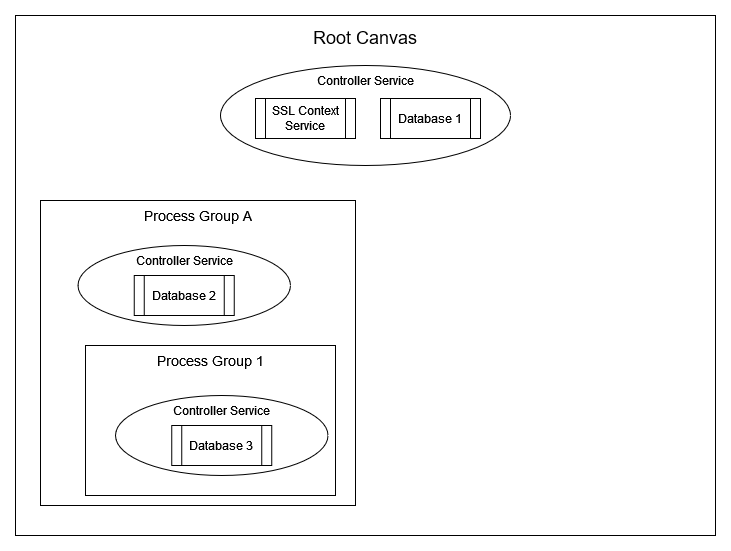
Process Group 1 (Child of Process Group A)
-
Database 3
Availability: Processors in Process Group 1 can use Database 3, plus inherited services: - Database 2 (from Process Group A) - Database 1 and SSL Context Service (from Root Canvas)
| Process Group A cannot access Database 3, since it belongs to its child, Process Group 1. |
Example Scenario: Separate Process Groups Without Inheritance
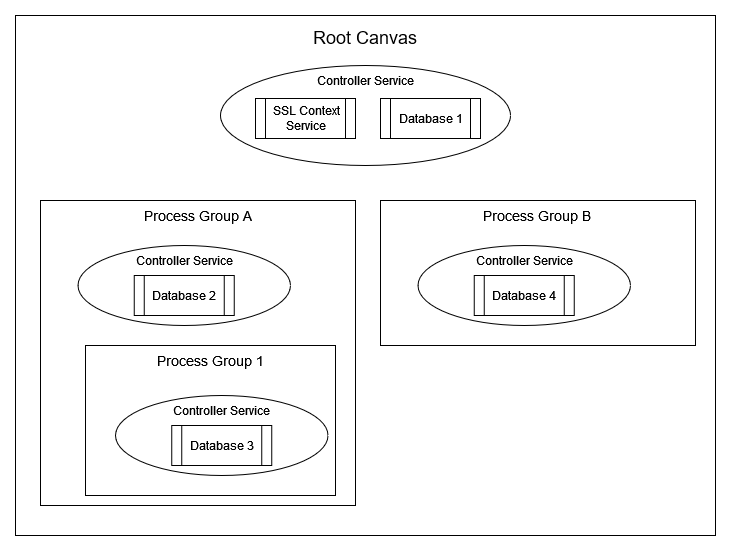
Process Group B
-
Database 4
Availability: Processors in Process Group B can use Database 4, plus inherited services: - Database 1 and SSL Context Service (from Root Canvas)
Process Group A and Process Group B are independent and do not share Controller Services, except for what is inherited from the Root Canvas.
Creating a Controller Service
To create a Controller Service: 1. Right click on the canvas and select Configure 1. Select the Controller Services tab. 2. Click Add (+) to create a new service. 3. Select the appropriate Controller Service type. 4. Configure the required properties (e.g., truststore/keystore for SSL, connection details for databases). 5. Apply changes and enable the service.
Shortcuts to Creating Controller Services
Some processors require a Controller Service to function. When configuring such a processor, the Properties tab provides a shortcut to: - Create a new Controller Service (if one doesn’t exist). - Edit the currently selected Controller Service.
Scope Consideration Before Creating a Controller Service
Before creating a Controller Service through a processor’s shortcut: - Consider where the service should be available. - If broader availability is needed, exit the processor configuration and create the service at a higher level.
| Controller Services cannot be moved after creation. |
If a service was created at the wrong level, it must be deleted and recreated in the correct location.
Example: - If a processor inside Process Group B creates a Controller Service, that service is only available in Process Group B or it’s children. - If the service should be available globally, create it at the Root Canvas instead.
Troubleshooting
| Issue | Cause | Solution |
|---|---|---|
Processor cannot access a Controller Service |
Service is defined in a different Process Group |
Define the service at a higher level (Root Canvas or parent Process Group) |
Unexpected Controller Service not available |
Service was created using a processor shortcut |
Verify where the service was created and adjust placement if needed |
Connection issues (SSL/DB) |
Incorrect configuration in Controller Service |
Review service settings and verify credentials |